Read, Sign, Done. Training on Autopilot with QMS Plus
Keep medtech training tied to current document revisions. QMS Plus uses your group mappings to assign work and keep signed records with the relevant revision.


TL;DR Training is one of the quietest ways a medtech QMS can fail an audit, and the usual fix needs a QA expert babysitting a spreadsheet. We built training into QMS Plus so a non-expert can manage routine assignments and records across the company. You configure the groups and document mappings, then review them as roles change. When a mapped document is revised, QMS Plus creates training for the people assigned to it and keeps the signed record tied to that revision. The routine work stays connected, while your quality owner keeps the judgment.
Many medical device companies have the same document somewhere in their QMS. An SOP that's approved, controlled, and signed off, but the training record does not show that everyone who performs the work completed the right training.
It's not negligence. It's drift. The document gets revised, the controlled copy updates, and the training never catches up. On paper everything looks clean. In an audit, that can become a finding. ISO 13485 already shapes quality systems for many EU MDR manufacturers. For devices subject to U.S. FDA requirements, the QMSR took effect on February 2, 2026 and incorporated ISO 13485:2016 into 21 CFR Part 820. The QMSR point is specific to U.S. FDA devices, but keeping people trained on current procedures matters across both contexts.
Why training is even required
A quick first principle, because it's worth being clear on why training matters at all. Your QMS is just a set of written procedures for how your company builds a safe device. Those procedures only mean something if the people doing the work actually follow them, and people can only follow what they've read and understood. When a procedure changes, whatever everyone learned last time is out of date. Training is how you keep what people do in sync with what the documents say. That's why auditors push on it so hard. It's the seam where the paperwork and the reality come apart.
Why training breaks
The default tooling for training is a spreadsheet, a folder of PDFs, and a recurring reminder. It works until it doesn't, and it tends to break in the same few ways. Someone joins and nobody updates the mapping. A document gets revised and the new round never goes out. An auditor asks you to prove a specific person trained on revision 3 of a specific SOP, and all you have is a spreadsheet row and a scanned signature.
None of this scales. It's a hundred small manual steps, and each one needs someone who knows the rules to catch it. That someone is normally a quality manager, tracking revisions, working out who needs retraining, and chasing signatures. Most early medtech teams don't have that person yet. So we built training into QMS Plus to take routine administration off their plate. Here's how.
How training works in QMS Plus
Start by assigning your people to functional groups such as QA, software, clinical, operations, or whoever needs the document. Assign each document to the groups that need to be trained on it. From there, training assignments follow your current group and document mappings. When someone joins a group, they pick up that group's training. When roles or document ownership change, the quality owner updates the mapping.
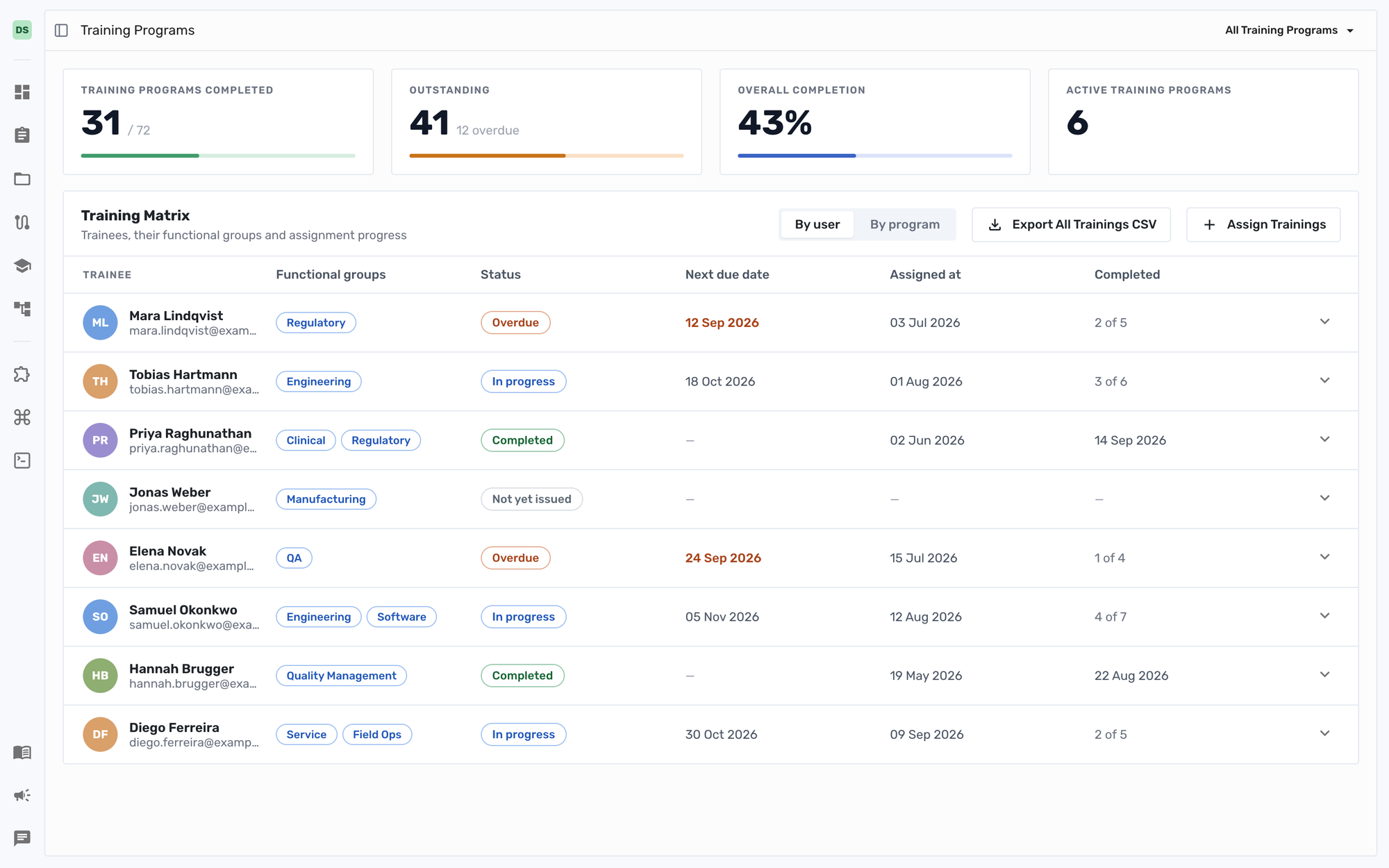
When a new revision of a document goes live, QMS Plus creates a training round for the people assigned through the current mapping, scoped to that revision. The trigger is the document revision, so assignment and revision tracking no longer depend on a separate manual reminder.
It lives where your other regulatory work already lives. Training lands in each person's task list next to everything else they owe, and the nav bar carries a live count of what's still open. No separate system to log into, no buried email. For whoever owns quality, the same place answers the questions that matter in an audit. It shows who's trained, who's outstanding, and who's overdue. That's the default view, not a report someone assembles the night before.
Your assistant can remind you. Through Dovetail's MCP server, QMS Plus training can connect to supported employee assistants. With the right permissions, an assistant can surface assigned training, nudge someone about open work, and help the quality owner spot gaps earlier. The work comes to people instead of people hunting for it.
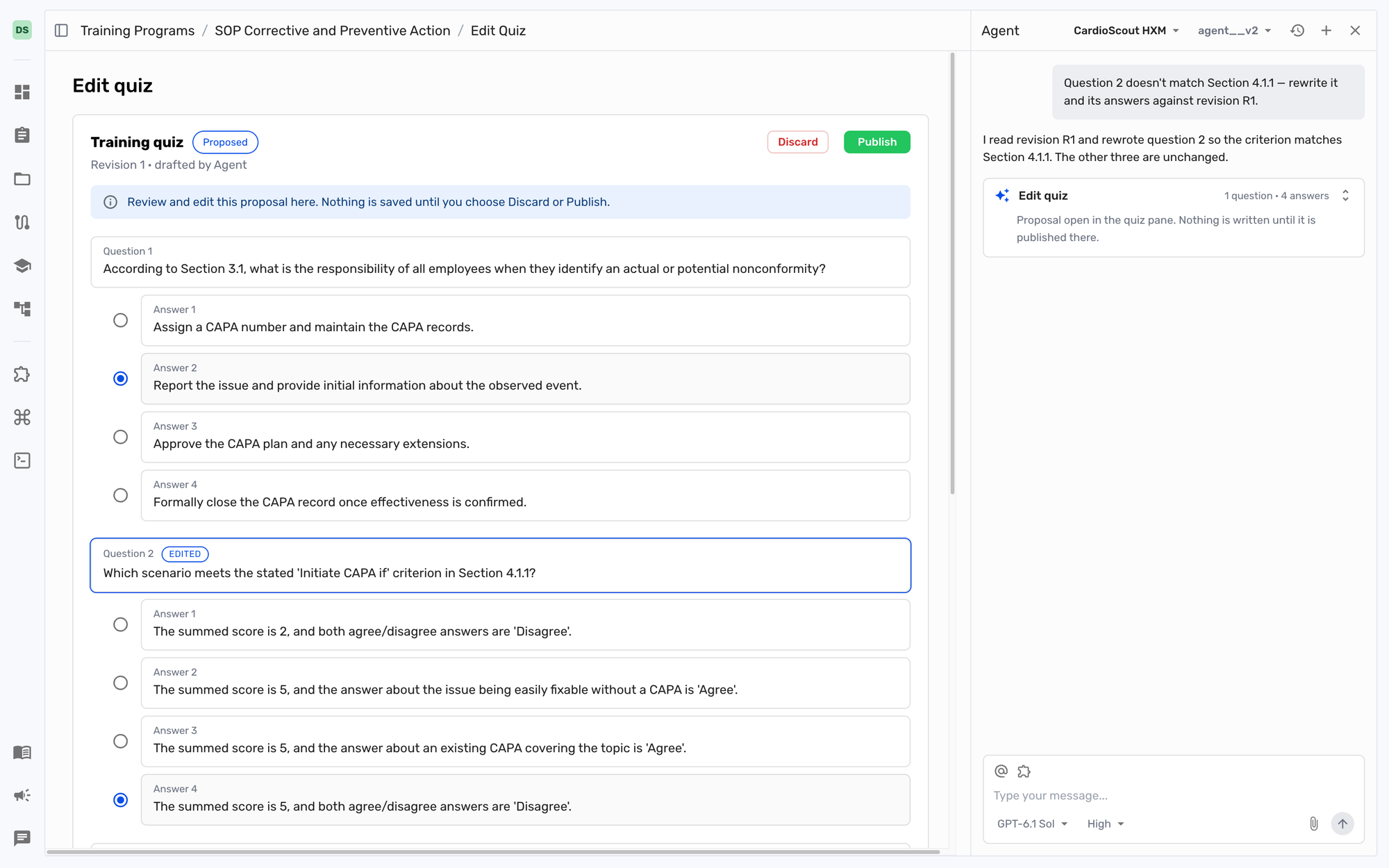
Read before sign, signed for good. The assignee opens the document inside QMS Plus. On a revision they see the redlines, so they're reading what changed, not re-reading forty pages. They confirm they've read the whole thing. For Quiz and sign programs, admins publish a revision-specific quiz and trainees must answer every question correctly before the signing step. They then sign with a 4-digit electronic-signature PIN that records their attestation. The workflow requires the document to be opened before signing. Read, sign, timestamp. Each action is written to the audit trail and tied to the person who performed it. Completed records stay tied to the person and revision after group changes. Removing someone from a group clears unfinished training while leaving completed records in place.
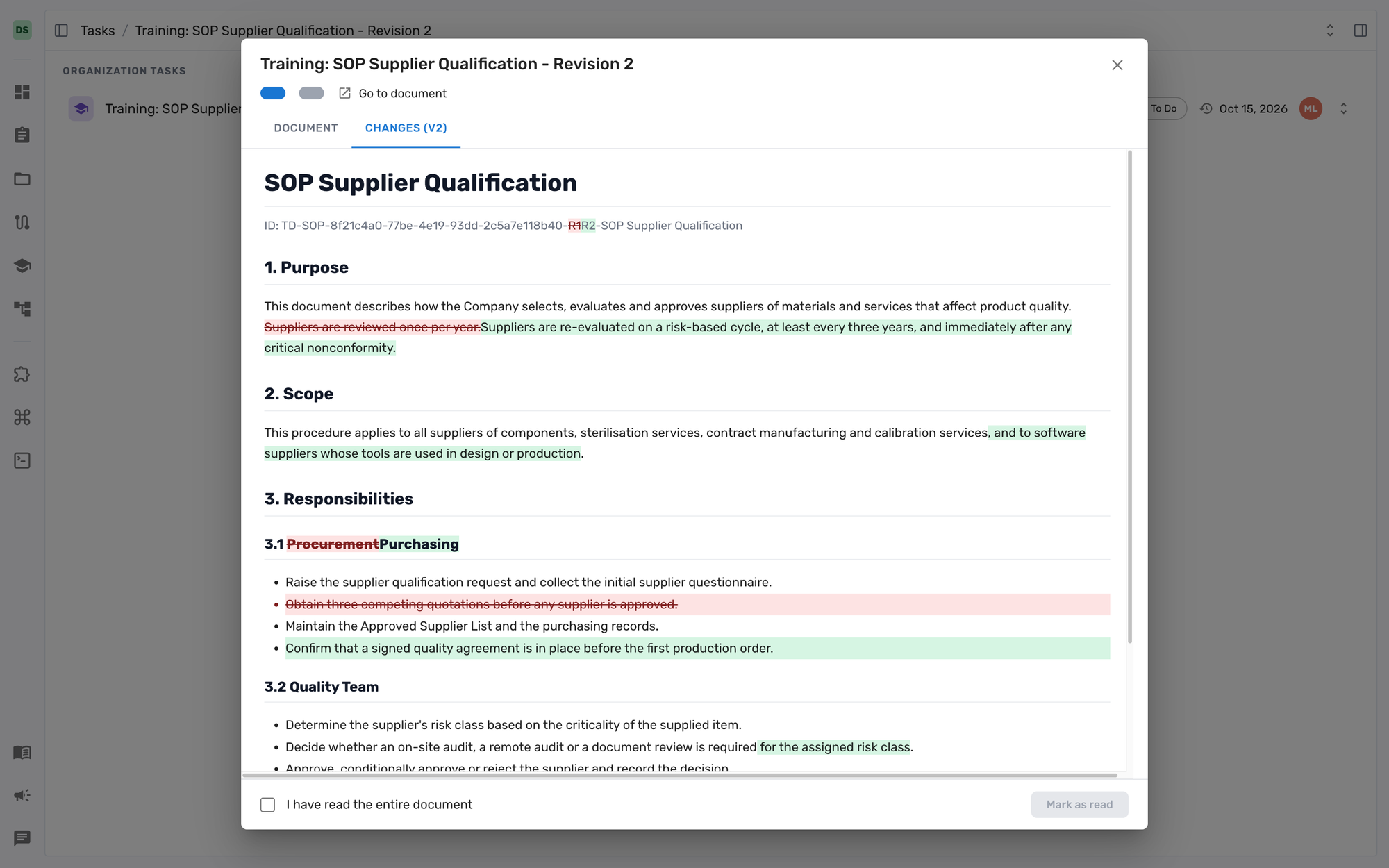
A completed training record captures the person, the date and time, the document and its revision number, and the attestation they signed. That produces a revision-specific electronic record as part of the normal workflow.
That's what we mean by training on autopilot. QMS Plus handles much of the routine administration, including assignment, revision tracking, reminders, records, and visibility. The part that has to stay human is the part we do not automate. Someone still reads the document and signs that they understood it.
Why this matters if you're a founder
You do not need an RA/QA lead chasing every routine assignment by hand. That's the point. Set up the groups and mappings, and QMS Plus handles assignment, revision tracking, reminders, and record-keeping from that configuration. A non-expert can manage the workflow, while a qualified quality owner still owns role mapping, exceptions, and training effectiveness.
And when you do bring in a quality team, routine administration does not need to become their full-time job. QMS Plus handles the repeatable workflow. They own the judgment calls.
Either way the point is the same. Your QMS is only as good as who's actually trained on it. We made the routine work easier to manage.
Training is live in QMS Plus now.
If you want to see what this looks like on your own quality program, book a Dovetail test drive. We will put QMS Plus training against a real workflow and show you how it handles assignments, revision-specific quizzes, signatures, and records.
Severin Högl is co-founder and CTO at Dovetail, where he builds tools that make regulatory work easier for medical device teams.